Slmgr Error 0x80041008 Invalid Parameter: How to Fix It
Slmgr /ipk or /skms-domain failing with 0x80041008 after the November 2026 update? Install the right fix update (KB5136483 and others) and reactivate.
Updated: 16 November 2026. Checked against Microsoft's out-of-band KB pages (KB5136483, KB5136489, KB5136487, KB5136490 and KB5136493), BleepingComputer's report on Microsoft's service alert, and the Windows IT Pro Blog post on moving activation scripts to PowerShell.
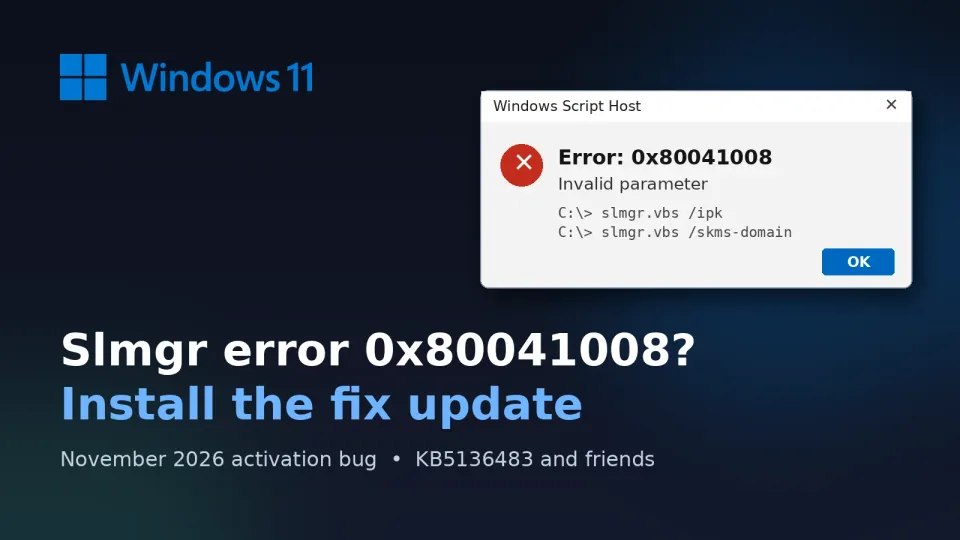
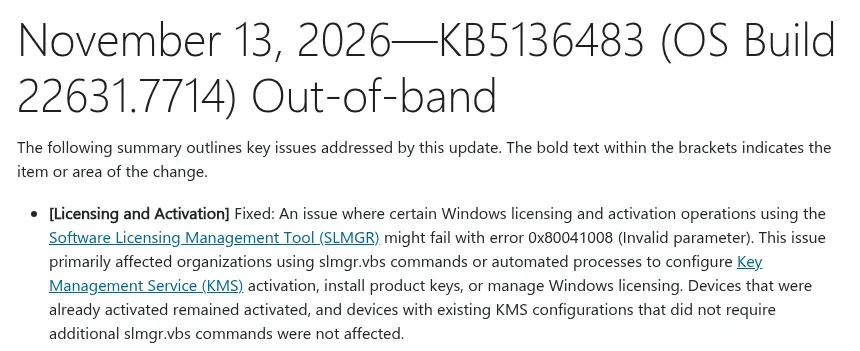
Short answer: if slmgr.vbs /ipk or slmgr.vbs /skms-domain started failing with "0x80041008 Invalid parameter" after the November 2026 Patch Tuesday update, it's a Microsoft bug, not your key or your KMS host. Microsoft fixed it on November 13 with out-of-band updates. Install the one for your Windows version (KB5136483 for Windows 11 23H2, KB5136493 for Windows 10 22H2 ESU and LTSC 2021, KB5136490, KB5136487 or KB5136489 for Windows Server 2019, 2022 and 2025), restart, and run your commands again. PCs that were already activated stay activated.
This one mostly hits IT folks. If you're building images, setting up new machines or running a task sequence that sets a KMS host or installs a generic volume license key, the script stops dead. At home on a normal retail or digital licence you probably never touch slmgr, and Microsoft says you aren't affected unless you run those commands.
How I wrote this: I didn't hit this bug on a fleet of my own, so I'm not going to pretend I did. Everything below comes from Microsoft's KB pages and release notes, Microsoft's slmgr and KMS documentation, and the reporting from BleepingComputer and heise. I've put the steps in the order I'd follow on a real machine.
Jump to:
- What the 0x80041008 slmgr bug is
- Quick checker: which fix update you need
- Step 1: Confirm it is this bug
- Step 2: Check whether the PC is still activated
- Step 3: Find your exact Windows version
- Step 4: Install KB5136483 on Windows 11 23H2
- Step 5: Install the fix from the Microsoft Update Catalog
- Step 6: Run your activation commands again
- Step 7: If you can't patch yet
- Step 8: Start moving scripts off slmgr.vbs
- FAQ
What the 0x80041008 slmgr bug is
The November 10, 2026 security updates broke some licensing commands that go through the Software Licensing Management Tool, slmgr.vbs. According to the service alert BleepingComputer quoted, affected devices "might encounter error 0x80041008, Invalid parameter (SWbemObjectEx), when running commands to activate Windows, configure Key Management Service (KMS), or manage product keys." The two commands named are /skms-domain and /ipk.
The affected versions are Windows 10 21H2 and 22H2, Windows 11 23H2, and Windows Server 2019, 2022 and 2025. I couldn't find Windows 11 24H2, 25H2 or 26H2 on Microsoft's list, and there's no out-of-band update for them, so if you're on one of those and see 0x80041008, look at your command syntax and key first.
The good news is in the same alert. Devices that are already activated stay activated. Machines that already have the right KMS client key and KMS settings in their image, and don't need to run those slmgr commands, aren't expected to be affected. Microsoft also notes that KMS-activated devices typically stay activated for up to 180 days after a successful activation, so nothing falls over tomorrow.
Quick checker: which fix update you need
Every one of these is a cumulative update released on November 13, 2026. Each includes the November security fixes, so installing it doesn't undo your patching.
| Your version | Fix update | OS build after | Where to get it |
|---|---|---|---|
| Windows 11, version 23H2 | KB5136483 | 22631.7714 | Optional updates in Settings, or the Update Catalog |
| Windows 10 22H2 (ESU) and Windows 10 Enterprise LTSC 2021 | KB5136493 | 19045.7850 / 19044.7850 | Microsoft Update Catalog only |
| Windows Server 2019 and Windows 10 Enterprise LTSC 2019 | KB5136490 | 17763.9488 | Microsoft Update Catalog only |
| Windows Server 2022 | KB5136487 | 20348.5873 | Microsoft Update Catalog only |
| Windows Server 2025 | KB5136489 | 26100.33828 | Microsoft Update Catalog only (with a checkpoint package) |
Step 1: Confirm it is this bug
0x80041008 is a generic WMI "invalid parameter" code, so it can show up for other reasons too, like a typo in the key. This specific bug has three tell-tale signs:
- The error appeared after the November 10, 2026 update went on the machine, and the same script worked before.
- It's
slmgr.vbs /ipk,/skms-domainor a similar licensing command that fails, often inside a task sequence or startup script. - The machine runs one of the versions in the table above.
To check that the November update is installed, open PowerShell as admin and run Get-HotFix | Sort-Object InstalledOn -Descending | Select-Object -First 5. On Windows 11 23H2 the November security update is KB5131087 (build 22631.7711). If all three signs match, skip any key troubleshooting. Your key is fine.
Step 2: Check whether the PC is still activated
Before rushing, see whether you even have a problem today. Run slmgr.vbs /dlv for the detailed licence info or slmgr.vbs /xpr for the expiry. You can also open Settings > System > Activation. If it says Windows is activated, the bug only matters the next time you need to change a key or a KMS setting.
If you're mid-deployment and new machines aren't activating, that's when it hurts, and you'll want the fix in your image before the next batch goes out.
Step 3: Find your exact Windows version
Press Win + R, type winver and press Enter. Note the version (23H2, 22H2 and so on) and the OS build. On servers, winver works the same way. Match it to the table. Windows 10 LTSC 2021 shows as 21H2 with build 19044, which is why it shares KB5136493 with Windows 10 22H2.
One heads-up for Windows 11 23H2: Microsoft's release health page says the November 2026 security update is the last one for 23H2 Enterprise and Education, and Home and Pro already stopped getting updates in November 2025. So KB5136483 fixes slmgr, but those machines should be on the upgrade list for 26H2 anyway.
Step 4: Install KB5136483 on Windows 11 23H2
Windows 11 23H2 is the only version where you can get the fix from Windows Update. It's an optional update, so it won't install by itself:
- Open Settings > Windows Update > Advanced options > Optional updates.
- Find the November 13, 2026 update (KB5136483) and select Download & install.
- Restart when asked, then run
winverand check the build reads 22631.7714.
Microsoft's KB page says you need an update from July 8, 2025 or later (such as KB5062552) already installed, plus the latest servicing stack update. Any machine that took the November security update already meets that.
Step 5: Install the fix from the Microsoft Update Catalog
For Windows 10 and every Windows Server version, Windows Update and WSUS won't offer these updates. You have to fetch them yourself:
- Go to the Microsoft Update Catalog and search for your KB number, for example
KB5136487. - Download the .msu that matches your edition and architecture (x64 or ARM64).
- Double-click the .msu, or install it silently from an admin prompt with
wusa.exe C:\Packages\<file>.msu /quiet /norestart, then restart.
Windows Server 2025 is a little different because it uses checkpoint cumulative updates. The KB5136489 page lists a required checkpoint package, KB5043080, next to the main file. Put both .msu files in the same empty folder, such as C:\Packages, and either install them in order (KB5043080 first) or let DISM handle it in one go:
DISM /Online /Add-Package /PackagePath:C:\Packages\windows11.0-kb5136489-x64_<id>.msuDISM scans the folder and installs the checkpoint first if the server still needs it. If you manage a lot of servers, import the package into WSUS or Configuration Manager from the catalog rather than doing it by hand.
Step 6: Run your activation commands again
After the restart, rerun what failed. For a typical KMS client that looks like this:
slmgr.vbs /skms-domain corp.example.com
slmgr.vbs /ipk <GVLK for your edition>
slmgr.vbs /ato
Swap in your own domain, or use /skms <host>:1688 if you point clients at one KMS host. The generic volume license keys are on Microsoft's KMS client activation keys page. Finish with slmgr.vbs /dlv to check the licence status reads "Licensed". If the error comes back after the fix update, then it's something else, and Microsoft's slmgr.vbs options page is the place to double-check the syntax.
Step 7: If you can't patch yet
Maybe change control won't let you push an optional update this week. In that case:
- Pause the slmgr steps. Hold any script or task sequence that runs
/ipkor/skms-domainon patched machines until the fix is in. - Use images that already carry the KMS client key. Microsoft says devices that don't need further slmgr configuration aren't affected.
- Ask Microsoft for the mitigation. Before the fix shipped, Microsoft told organizations that needed something immediately to contact Microsoft Support for business.
- Don't uninstall the November security update. It's tempting, but it reopens the security holes it closed. The out-of-band update already contains those fixes, so going forward is safer than rolling back. heise made the same point.
You may also see a PowerShell workaround on admin blogs that calls the licensing WMI class directly with Invoke-CimMethod instead of slmgr. Microsoft hasn't documented that as a mitigation for this bug, and the error itself comes from WMI, so I wouldn't count on it. If you try it, test on one machine first.
Step 8: Start moving scripts off slmgr.vbs
This bug is a good nudge. VBScript is deprecated and will eventually be removed from Windows, and slmgr.vbs goes with it. In its Windows IT Pro Blog post, Microsoft now recommends the OSLicense PowerShell module for activation tasks. The basic mapping is:
| Task | slmgr.vbs | OSLicense equivalent |
|---|---|---|
| Activate Windows | slmgr.vbs /ato | Invoke-OSLicense -ActivateOnline |
| Install a product key | slmgr.vbs /ipk | Invoke-OSLicense -InstallProductKey |
| View licensing status | slmgr.vbs /dlv | Get-OSLicenseInfo |
There's a catch, so don't rewrite everything tonight. On Windows 11, the module needs the August 27, 2026 preview update (KB5120998) or later, and on Windows Server it's only planned for the next major release. Run Get-Module -ListAvailable OSLicense to see whether a machine has it. Microsoft itself says to check the final cmdlet names against the OSLicense reference before you use them in production. For now, the fix update is the real answer, and OSLicense is the longer-term plan.
Related guides: this month's update also broke some printing, which I covered in the November Windows update printing bug. If the November update won't install at all, see KB5132061 install error 0x800f0993, and for a download that just sits there, Windows Update stuck at 0% or 100%. My Windows 11 100% disk usage guide links all my other Windows fixes.
FAQ
What does slmgr error 0x80041008 mean?
It's a WMI "Invalid parameter" error. Since the November 10, 2026 updates, it's mostly caused by a Microsoft bug that breaks slmgr.vbs /ipk and /skms-domain on Windows 10 21H2/22H2, Windows 11 23H2 and Windows Server 2019 to 2025. Microsoft fixed it in out-of-band updates on November 13.
Will my PC lose activation because of this bug?
No. Microsoft says devices that are already activated stay activated. KMS clients typically remain activated for up to 180 days after their last successful activation, so you have time to install the fix.
Why don't I see KB5136493 in Windows Update?
For Windows 10 and Windows Server, Microsoft only published the fix to the Microsoft Update Catalog. Windows 11 23H2 is the only version where it appears in Windows Update, under Optional updates.
Does this affect Windows 11 24H2, 25H2 or 26H2?
They aren't on Microsoft's list of affected versions and didn't get an out-of-band update. If you see 0x80041008 on those, check your key, your command syntax and your KMS host settings first.
Should I uninstall the November update to fix slmgr?
No. That removes security fixes. Install the matching out-of-band update instead. It's cumulative and includes the November security fixes.
If you hit this on a version I haven't listed, or the error stayed after the fix update, tell me in the comments with your build number and I'll look into it.
Comments ()