WhatsApp AI Photo Expand Hits iPhone
WhatsApp Meta AI Expand fills photos to 9:16 on iOS beta 26.44.10.16 and some store builds. Preview before send; Status-friendly.
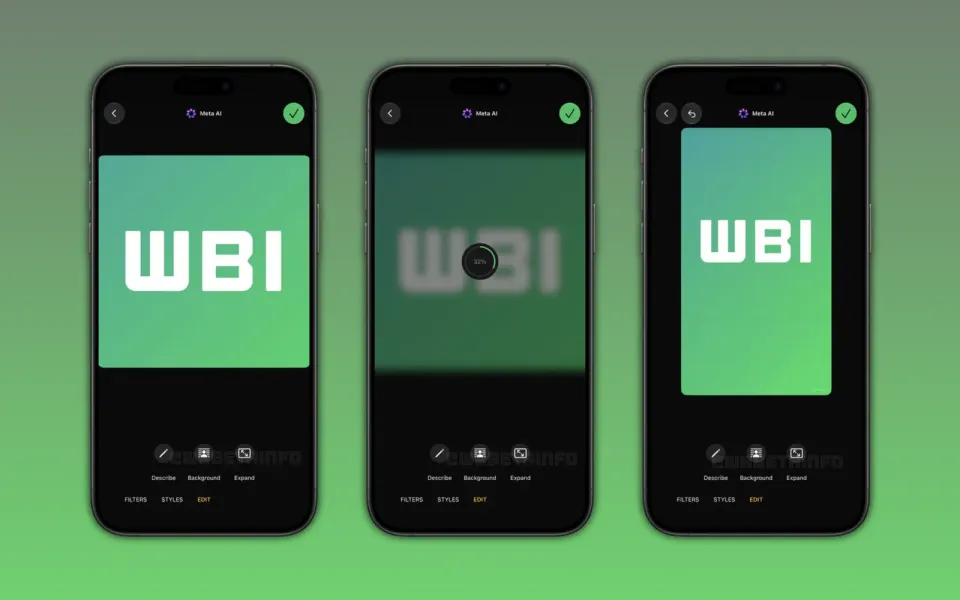
WhatsApp is rolling out a Meta AI photo expansion tool on iPhone. Pick a photo to send or put in Status, tap Expand in the drawing editor, and the app fills in the edges into a tall 9:16 frame — useful when a landscape shot would otherwise sit in black bars.
What happened
On November 5, WABetaInfo reported Expand in WhatsApp beta for iOS 26.44.10.16 on TestFlight, and said some App Store builds already show it too. 9to5Mac covered the same rollout (their X post); WABetaInfo also flagged it on X. Android beta got the same Expand option a day earlier.
Flow is straightforward: attach a photo in a chat or Status, open the drawing editor, pick the AI expand control, wait a few seconds while Meta AI invents the missing borders, then preview. Undo restores the original; tapping Expand again regenerates a different fill. WhatsApp does not send until you confirm. WABetaInfo notes the target is a 9:16 portrait that looks like a continuation of the scene, not a stretch, and results are better when the original has clear detail near the edges. Square or landscape shots are the ones that benefit most for Status.
Availability is still a server-side drip. Being on 26.44.10.16 (or the matching store build) is necessary but not enough — Meta AI also has to be available in your country and language. There is no public “everyone gets it by Friday” date; WABetaInfo only says more people over the coming weeks.
Why it matters
Status is huge for WhatsApp users, and black bars on a horizontal photo look lazy. Until now people bounced to Photos, CapCut, or Canva just to pad a frame. Keeping Expand inside WhatsApp cuts that hop — and keeps the edit next to the same Meta AI tools (Describe, Background, Animate) already landing in the editor.
It is also generative fill, not a crop. The new pixels are invented by Meta’s model. That is fine for a holiday Status; less fine if you are sending a receipt, ID crop, or anything a stranger might treat as literal. Preview every time.
What to do
- Check the build: Settings → Help → App info (or the App Store listing). Beta testers want at least 26.44.10.16 from TestFlight; store users should update WhatsApp, then try a square photo in a chat.
- Look for Expand: attach a photo → drawing editor → Restyle / AI edit controls. If Expand is missing, you are still on the waitlist or Meta AI is not offered on your account.
- Status tip: expand a landscape shot before posting so it fills the screen. Undo if the AI invents weird sky or furniture.
- Storage: AI edits and Status media still eat space. If WhatsApp is bloating your iPhone, our guide on freeing iPhone storage without deleting photos still applies — clear WhatsApp’s own media cache first.
- Related WhatsApp news: scheduled messages are still rolling through beta separately — see WhatsApp scheduled messages on iPhone and the earlier group chat features note.
My take
I would use Expand for Status and casual chat photos, not for anything that needs to stay documentary. The undo-before-send design is the right default; treat every AI-filled border as a draft until you like it. Indian users live in WhatsApp more than almost any other app, so a Status that fills the screen without opening another editor is a real quality-of-life win — when Meta AI is actually enabled on your number. If Expand never appears after an update, do not chase random TestFlight IPAs from strangers; wait for the server flag. And if Meta AI is blocked in your region, this feature simply will not show, no matter which build you install.

Comments ()