Steam Now Shows Average Steam Deck FPS Before You Buy
Steam store pages now show the average framerate real players get on Steam Deck, with a histogram for stutter. Where to find it and how to read it.
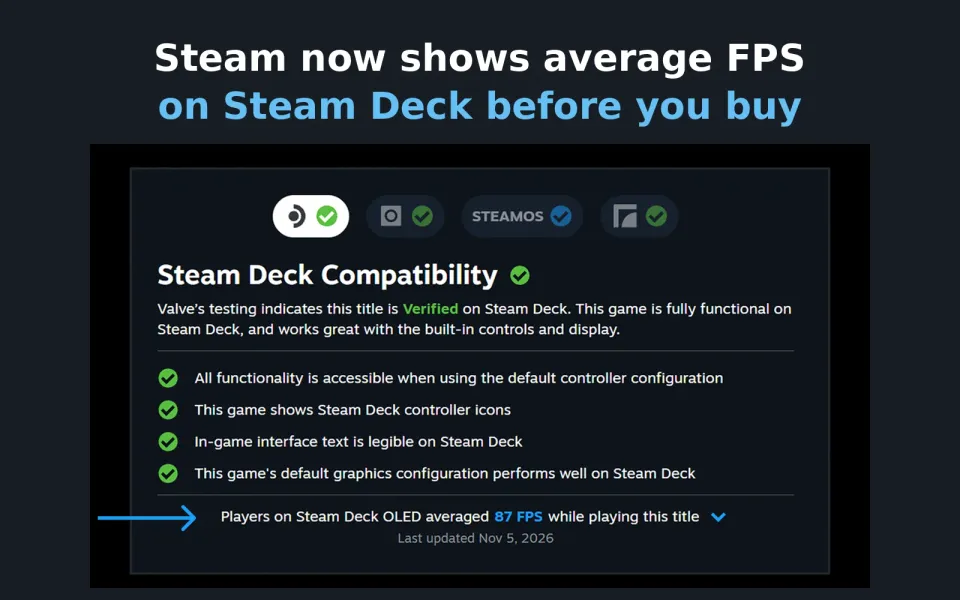
Steam Deck owners have always had to guess a bit before buying a game. The green Verified badge tells you a game works, but it doesn't tell you whether it runs at a smooth 60 or limps along at 30. Valve just fixed that with real numbers from real players.
What happened
In a Steam news post on November 9, Valve announced that store pages now show the average framerate players get on Steam Deck. You'll find it on a game's store page under Steam Deck Compatibility, then Learn more. A line like "Players on Steam Deck OLED averaged 87 FPS while playing this title" sits at the bottom, with a date showing when it was last updated.
Click it and you get a histogram showing what share of play sessions ran at each framerate, split by Steam Deck OLED and LCD. Valve says thousands of games already have data, covering titles rated Verified, Playable and Unsupported, and the list will keep growing. The same numbers show up in your Steam Library if you're on the Steam Client Beta. Tom's Hardware and VideoCardz also covered the change.
Where the numbers come from
Nobody at Valve sat down and benchmarked thousands of games. The figures come from Deck owners who said yes to sharing framerate data anonymously, which Valve says is most of them. There's a catch on settings: only Decks left at the default cap count (90 FPS on OLED, 60 on LCD), while whatever you've changed inside a game's own menu isn't filtered out. Valve says the results bunch up tightly anyway. Niche games need a minimum number of samples first, so a small indie you're eyeing might show nothing yet.
PC players get this later, maybe. Steam's desktop Beta client has started asking people to opt in too, and Valve says everyone will see that prompt eventually. There's no date for PC framerates on store pages, and no word on whether they'd be sorted by graphics card.
My take: this is the most useful number on the store page
I like this a lot, mostly because Verified has always been a pass or fail test. A game can pass and still run at a framerate you'd find choppy, and an Unsupported game can be perfectly playable if you don't mind a few rough edges. Valve says as much in its post. A real average from thousands of players fills that gap better than any review I could write.
A few things I'd keep in mind when reading it:
- Check the right model. The histogram has separate OLED and LCD tabs. The OLED's 90 Hz screen and better battery give it higher numbers, so LCD owners should switch tabs before deciding.
- Look at the shape, not only the average. Small bars at the low end mean stutter. Valve also explains that a split between 90 and 45 on the OLED usually comes from VSync, not a broken game, and often means the game is capped at 60.
- Help the data along. If you want more games covered, you can turn sharing on under Steam Account Settings, then Data & Browsing, then Anonymous Game Framerate Data. The same switch turns it off if you'd rather not share.
This matters wherever you are. The Deck still isn't sold officially in some countries, India among them, but plenty of people import one or buy second-hand, and Steam prices in rupees make a bad purchase sting all the same. Checking a number before you spend is just sensible.
If you're still choosing a handheld, my Steam Deck vs ROG Xbox Ally X vs Legion Go S comparison covers the trade-offs, and if a recent update left your Deck stuck on a blank screen, start with my Steam Deck black screen fix. This is also the second store change from Valve in a few weeks, after the Personal Calendar left Steam Labs.

Comments ()